
The MCP Protocol by Anthropic comes at a strategic time. Intelligent AIs must now adapt to their environment, understand context, and easily interact with various AI tools.
Thanks to an open standard, the Model Context Protocol simplifies connections. It replaces complex systems with a simple and quick to install solution. It allows large language models to easily connect to databases, files, or APIs.
The MCP Protocol makes it easier for intelligent AIs to adapt and work easily with different AI tools. In this article, discover how the Model Context Protocol is transforming the use of AI in the professional world.
What is the MCP Protocol?
The Model Context Protocol (MCP), developed by Anthropic, is an open standard. It helps intelligent AIs, especially large language models (LLMs), easily connect to external data and tools.
The MCP Protocol functions as a USB-C port for AI. It provides a single connection to local folders, databases, APIs, AI tools or cloud services. This avoids creating a specific integration for each tool.
This protocol simplifies connections and helps intelligent AIs understand their context in real time. Thanks to the MCP Protocol, artificial intelligence becomes more connected, modular and easy to integrate into different environments.
Why is it so important?
The MCP Protocol plays a key role in the evolution of AI. It solves a major problem: the difficulty of connecting intelligent AIs to different AI tools and data sources. By acting as a universal connector, it avoids custom integrations, which are often long and complicated.
This protocol reduces technical complexity. It helps deploy systems faster and maintain better consistency at scale.
The MCP Protocol creates a simple and secure bridge between AI models, AI tools and data. By facilitating access to context, it accelerates the creation of more powerful and efficient AI applications.
Objectives of the MCP
Before the arrival of the MCP Protocol, connecting an AI to a database required a tailor-made implementation. Each integration required a custom connector, slowing down projects and increasing technical effort.
This method created rigid systems and technical debt. Architectures became heavy, difficult to evolve and poorly suited to modern environments.
The main goal of the MCP Protocol is to simplify all of this. It provides a unified method for connecting intelligent AIs to data sources. This standard improves work between AI tools, accelerates AI integrations and facilitates their evolution.
The basic architecture
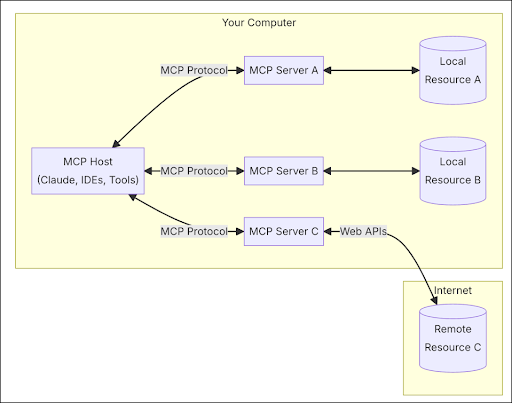
The MCP Protocol is based on a client-server architecture. This means that an application can connect to several servers at the same time. This structure is modular and flexible. It allows large language models to easily exchange with different AI tools and data sources.
This seamless connection makes it easy for intelligent AIs to access the right AI tools. They no longer need tailor-made connections. Everything becomes simpler, faster and more secure.
- MCP hosts: these are programmes like AI applications, Claude Desktop or integrated authoring environments (IDE). They connect to MCP servers to access useful data.
- MCP customers: These interfaces maintain a direct connection with the MCP servers to enable two-way communication.
- MCP servers: These are lightweight programmes. They share specific functions thanks to the standardized protocol. These servers provide data and tools to MCP clients.
- Local Data Sources and Remote Services: MCP servers can connect to different types of content. These could be files on the computer, databases, or online tools like APIs. These connections, local or via the Internet, are secure. They enable intelligent AIs to use useful data to better understand their context.
The three key interfaces: resources, tools, prompts
The power of the protocol is based on three fundamental building blocks:
- Resources: These are files, databases, APIs, logs or images. They are shared by MCP servers using unique links (URI). These resources serve as context for large language models. Applications choose when and how to use them.
With the MCP Protocol, intelligent AIs easily access up-to-date and well-organized data. This helps produce more accurate, useful and reliable responses.
- Tools: These are functions offered by MCP servers. These AI tools allow large language models to perform concrete actions. They can run a command, read a file, or connect to an API. The model can launch the tool, but it needs someone's approval.
Each AI tool follows a simple structure with clear rules. This ensures secure, transparent use and is compatible with other systems. Using these AI tools, developers can create autonomous and efficient AI agents.
- Prompts: These are ready-to-use templates offered by MCP servers. They allow humans to easily initiate typical exchanges with a model, such as a large language model. Each prompt is simple to use and quick to activate.
These prompts may contain parameters, context, or useful data. This helps the AI follow a clear path and give precise answers. Simply choose the prompt that corresponds to the need to start an effective action.
MCP Protocol Limit
One of the main obstacles to the adoption of the MCP Protocol is its technical implementation. To use it on Claude Desktop, you must have advanced skills. This makes access difficult for non-technical people or non-developers.
Even technical profiles must go through GitHub to find or share servers, which limits the openness of the system. Additionally, since MCP servers operate locally, it becomes difficult to access files remotely or from the cloud.
MCP Integration Guide
Integrating the MCP Protocol into applications like Claude Desktop transforms these tools into intelligent agents capable of interacting with various data sources. This integration allows large language models to access and manipulate local files, improving their efficiency in everyday tasks.
Installation steps:
- Download Claude Desktop: Start by downloading the application from the official website, compatible with macOS and Windows. Make sure you have the latest version by accessing the menu “Claude” > “Check for updates”.
- Create or modify the MCP file: In Claude's settings, click “Developer”, then on “Change configuration”. This opens or creates the file claude_desktop_config.json. Then add the MCP server information using the command npx.
- Check Node.js: The MCP Protocol uses Node.js. Open a terminal and type node –version. If the system does not recognize it, install Node.js since nodejs.org.
- Restart Claude Desktop: restart the application. A hammer icon will appear if the MCP server was successfully detected.
- Testing of tools: Give simple instructions like “Can you write a text file on my desktop?” ». Claude will first ask for your consent before using the MCP Protocol AI tools.
This process transforms Claude into a true intelligent agent, capable of interacting with your local files in a secure and controlled manner.
Conclusion
Anthropic's Model Context Protocol (MCP) marks a key advance in creating intelligent AI. This standard simplifies access for large language models to data and AI tools.
Thanks to the MCP Protocol, complex integrations disappear. Large language models can interact more easily with their environment. The result: more efficient, accurate and secure intelligent AIs.
MCP provides a solid foundation for creating more agile and flexible AI solutions. It’s a game-changer for developers and businesses, redefining the architecture of modern artificial intelligence.
???? Enjoy our exclusive e-book
Do you want to use artificial intelligence in your job? Download our 100% free e-book, on AI training for professionals. You will find concrete cases there: task management, creation of AI agents, integration of the MCP Protocol, and more. This guide shows you how AI is transforming your everyday work.
Download it now and move towards useful, clear and accessible AI.